

IDE Plugins
IDE Integration
Section titled “IDE Integration”Gopher Glide ships official plugins for both JetBrains and VS Code (including Open VSX-compatible editors). Both plugins bring the complete gg workflow — running traffic simulations, recording and comparing Snapshots, gating CI on regressions — directly into your editor with a native run dashboard and a full Snap Explorer, no terminal required.
JetBrains Plugin
Section titled “JetBrains Plugin”Install from the JetBrains Marketplace, or search Gopher Glide in Settings → Plugins → Marketplace.
Verified on IntelliJ IDEA, GoLand, WebStorm, Rider, PyCharm Community, PhpStorm, and RubyMine. Requires IntelliJ Platform 2024.2+.
⚡ Quick Start
Section titled “⚡ Quick Start”- Install the plugin — if no
ggbinary is found, the plugin offers to download it for you the moment you open a project. - Open any
.httpfile and click the Run GG gutter icon (or right-click → Gopher Glide (GG) → Run). - Pick a load profile from the popup — optionally override peak RPS/duration and tick Record snapshot.
- Watch it run live in the Gopher Glide tool window at the bottom of the IDE.
- Switch to the Snaps tab to view, diff, assert, or prune recorded snapshots.
▶️ Running Traffic Simulations
Section titled “▶️ Running Traffic Simulations”The plugin adds gutter run icons and a right-click Gopher Glide (GG) menu (Project View, Editor, and Editor Tab) to your config and .http files. The menu is grouped into Run, Generate, and CI sections.
On .http files:
- Run GG — opens a profile picker covering all 21 built-in load profiles, grouped by category. Picking a profile opens a dialog pre-filled with that profile’s default peak RPS and duration — override as needed — plus a Record snapshot checkbox with an optional tag.
- Run GG (Config) — only shown when the
.httpfile has a sibling.gg.yaml; runs that config directly. - Generate config.yaml… — scaffolds a starter
.gg.yamlfor the file without running anything.
On .gg.yaml files:
- Run GG — prompts for optional snapshot recording (with a tag), then runs the config as-is.
🖥 Native Run Dashboard
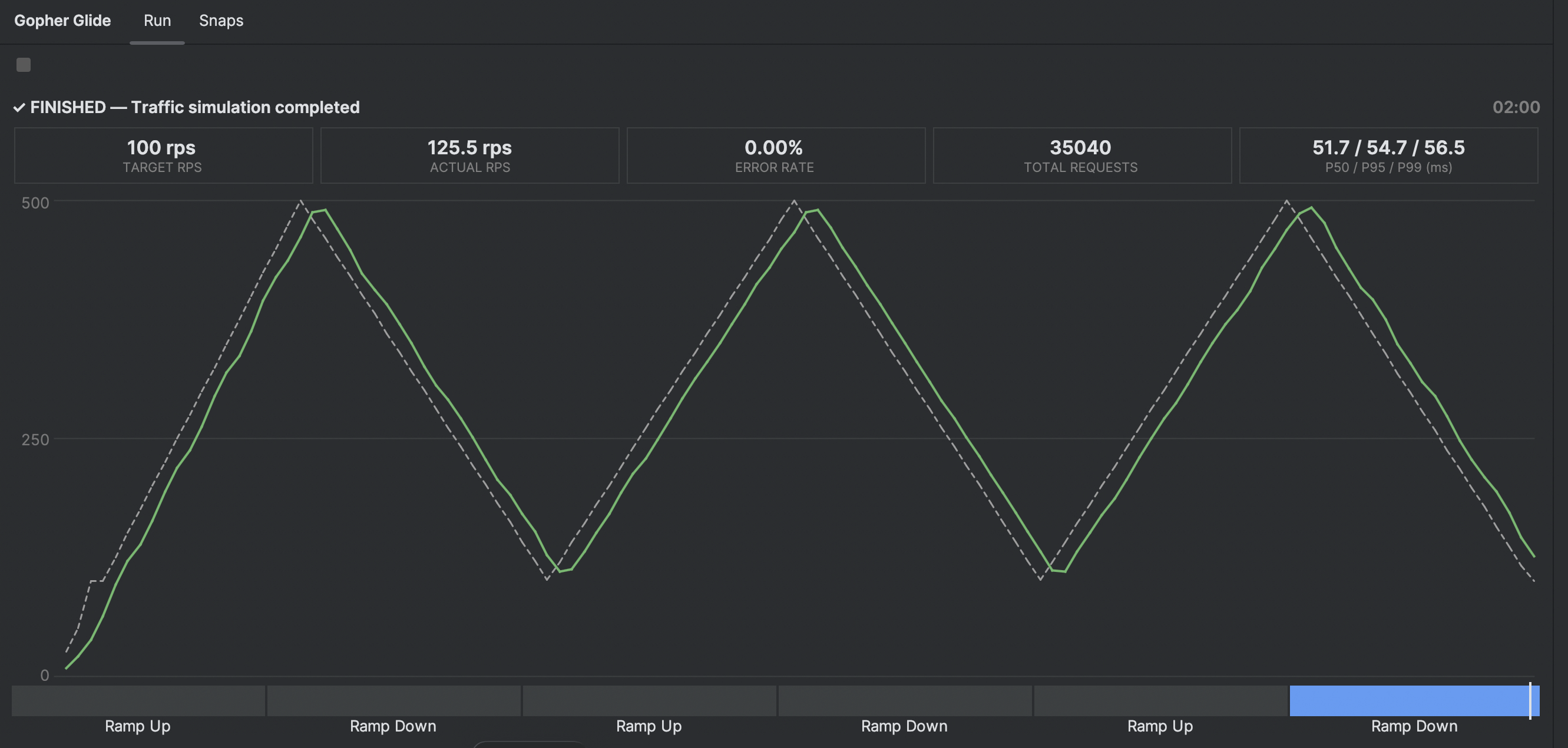
Section titled “🖥 Native Run Dashboard”While a simulation runs, the Run tab of the Gopher Glide tool window updates roughly once per heartbeat (~5s) with:
- Current status and elapsed time
- A row of metric cards: Target RPS, Actual RPS, Error Rate, and Total Requests
- A P50 / P95 / P99 latency card
- A scaled RPS chart
- A stage timeline — a horizontal progress bar with segment widths proportional to each stage’s actual duration
- A Stop action that ends the run cleanly —
ggfinishes writing the snapshot first. If it doesn’t answer, the plugin interrupts it, and a second click forces it to end.
Live control (JetBrains plugin 7.0+, gg v1.3.0+) adds a strip above the metric cards while a run is in progress:
- Bias — −10 / −5 / +5 / +10 change the target RPS without stopping the run; Reset returns to the planned rate. The badge shows the bias
ggreports. - Mark… — drop a named marker at the current point of the run. A mark is stamped when you confirm its label.
- Bias changes and marks are drawn on the RPS chart, and both are recorded in the snapshot.
With an older gg, the strip is replaced by a short notice that names the installed version and offers to install or upgrade it. The run itself works as before.
🗂 Snap Explorer
Section titled “🗂 Snap Explorer”The Snaps tab is a full native UI for managing Snapshots — list, view, diff, assert, and prune.
Toolbar actions:
- Refresh — reload the snapshot list from disk.
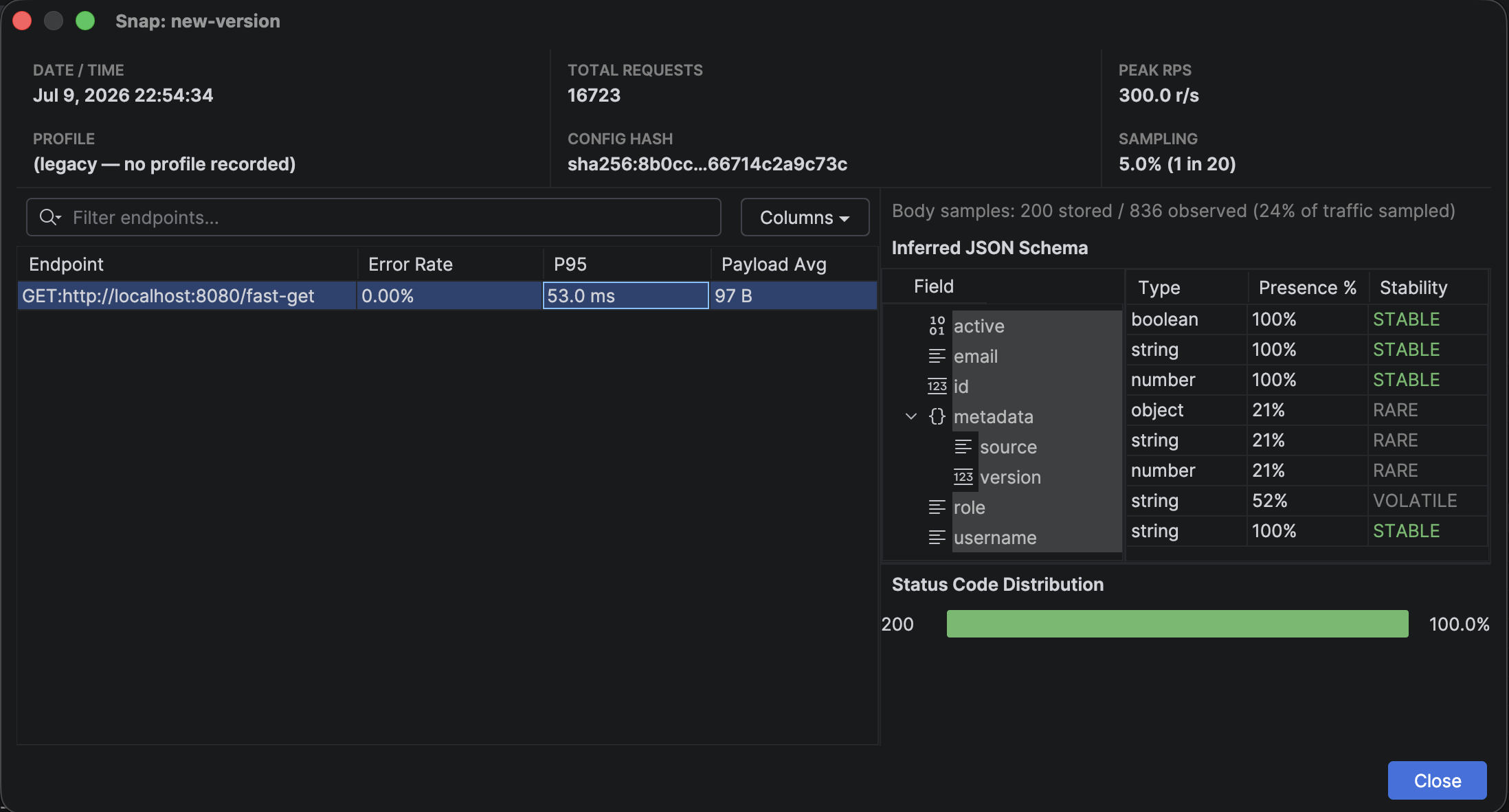
- View Detail — inspect a snapshot. The detailed view provides an Endpoint Breakdown (Error Rate, P95, Payload Avg) and a dedicated Inferred JSON Schema viewer showing the precise
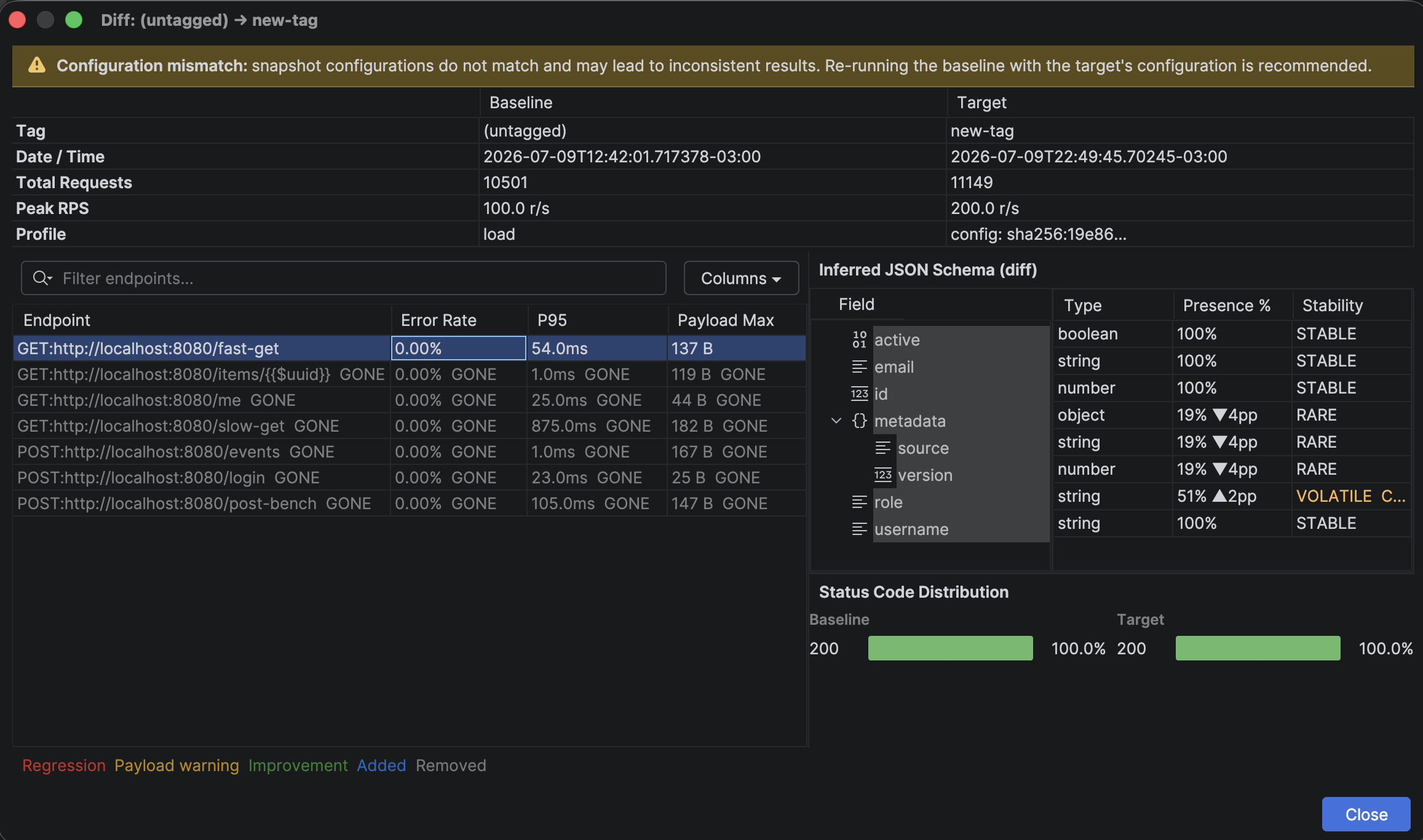
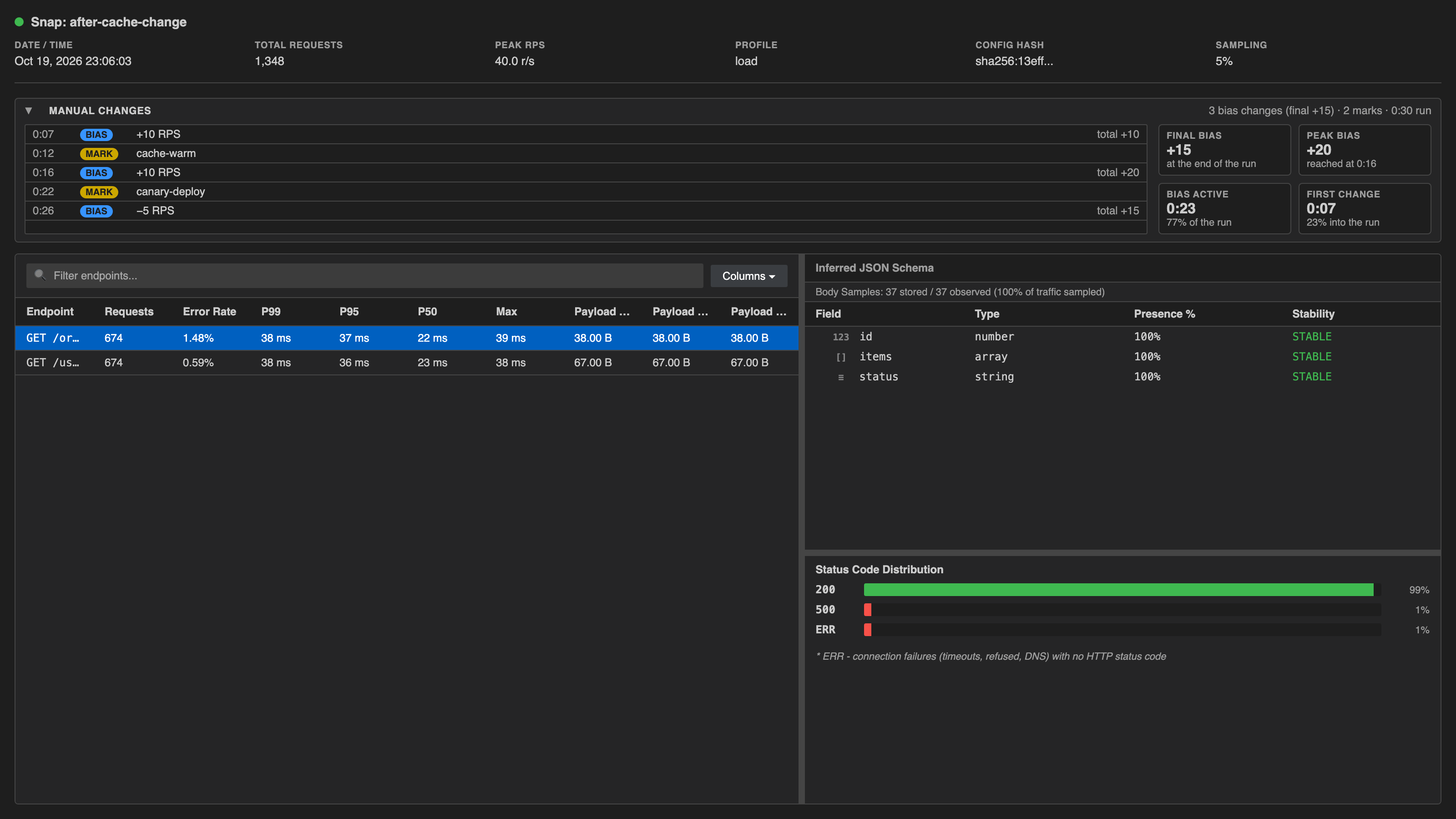
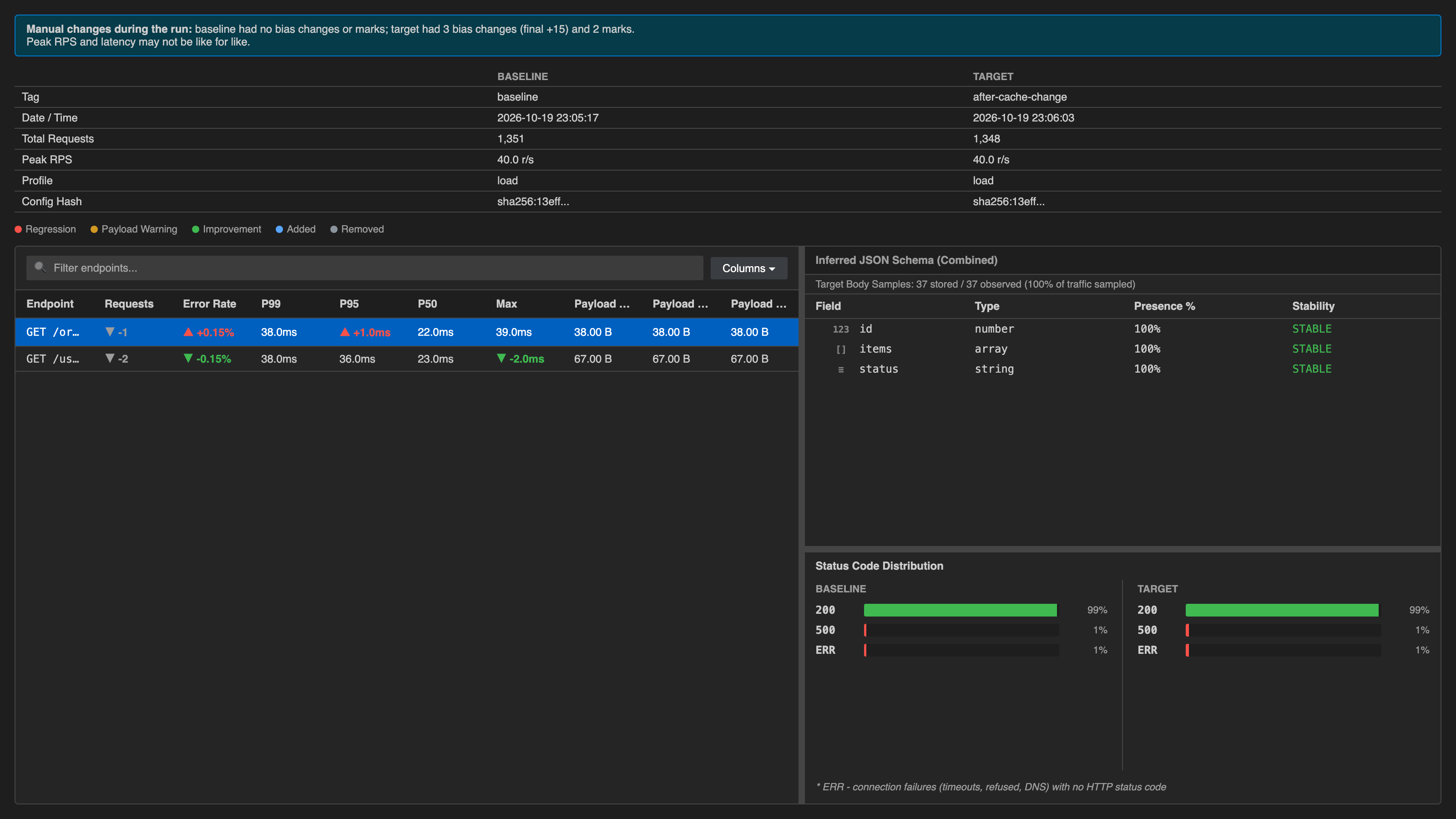
Type,Presence %, andStabilityof every field observed during the run. For runs recorded withggv1.3.0+, a Manual changes section lists every mark and bias change in time order, with final bias, peak bias, how long a bias was in effect, and when the first change happened. - Compare (Diff) — semantically diff two snapshots side-by-side (select exactly two rows). The diff UI automatically flags Configuration mismatches (e.g., if you diff a baseline run with a different config hash) and highlights specific schema regressions, such as a field’s presence dropping from 100% to 19% under heavy load. When either run had marks or bias changes made by hand, a one-line notice says so, since those runs may not be like for like.
- Assert… — run
gg snap assertbetween any two snapshots against configurable thresholds. - Prune… — clean up old snapshots by ID(s), tag, keep-last count, or age (e.g.
30d) — with a dry-run preview by default.
🛡️ One-Click CI Workflow Generator
Section titled “🛡️ One-Click CI Workflow Generator”Generate CI Workflow… (Tools menu, or right-click → Gopher Glide (GG)) scaffolds a ready-to-run .github/workflows/gg.yml implementing the full headless regression-gating loop with push-to-main baseline capture and PR diff comments. See CI & Containers for what that workflow does under the hood, and for the container image if you’re wiring up a different CI system by hand.
⚙️ Settings & Onboarding
Section titled “⚙️ Settings & Onboarding”Available under Settings / Preferences → Tools → Gopher Glide:
- Set a custom
ggbinary path or custom snapshots directory. - Run panel refresh interval — controls the
--heartbeat-intervalpassed togg. - Check for Updates / Install Gopher Glide — one-click binary management with download progress.
- Check for gg updates on startup — on by default; looks for a newer release at most once a day and shows one notification with Update Now, Open Settings and Skip This Version. It stays quiet when you’re offline, already current, or use a custom binary path.
- Copy Diagnostics to Clipboard — useful when filing a bug report.
Compatibility
Section titled “Compatibility”- IntelliJ Platform baseline:
2024.2and newer - Verified on IntelliJ IDEA, GoLand, WebStorm, Rider, PyCharm Community, PhpStorm, and RubyMine
VS Code Extension
Section titled “VS Code Extension”Install from the VS Code Marketplace or Open VSX Registry, or search Gopher Glide in the Extensions panel (Ctrl+Shift+X).
Compatible with VS Code 1.120.0+ and any Open VSX-compatible editor (VSCodium, Gitpod, etc.).
⚡ Quick Start
Section titled “⚡ Quick Start”- Install the extension — if no
ggbinary is found, it downloads one automatically on first use. - Open any
.httpor.restfile — a Run button appears in the editor title bar and a CodeLens link appears inline above each request. - Pick a load profile from the Quick Pick (or let the extension use your
gg.defaultProfilesetting). - Watch it run in the Gopher Glide panel at the bottom of the editor — and steer it live from there (see Live control).
- Switch to the Snaps tree view to browse, diff, and assert snapshots.
▶️ Running Traffic Simulations
Section titled “▶️ Running Traffic Simulations”Entry points on .http / .rest files:
- Editor title bar play button — one click to run with a profile picker.
- CodeLens — inline run/config links above each request block.
- Right-click context menu (Editor and Explorer) → Gopher Glide submenu.
On .gg.yaml files, the context menu shows Run (Config) to run the config directly.
All 21 built-in profiles are available in the Quick Pick, plus optional RPS/duration overrides and snapshot capture.
🖥 Native Run Dashboard
Section titled “🖥 Native Run Dashboard”The Gopher Glide panel at the bottom of the editor shows a live webview updated from gg’s headless heartbeat stream:
- Status and elapsed time
- Target/Actual RPS, Error Rate, Total Requests
- P50 / P95 / P99 latency percentiles
- Live RPS chart and stage timeline
- A Stop button that ends the run cleanly —
ggfinishes writing the snapshot first. Ifggis stuck, the button becomes Force Stop.
Live control in VS Code
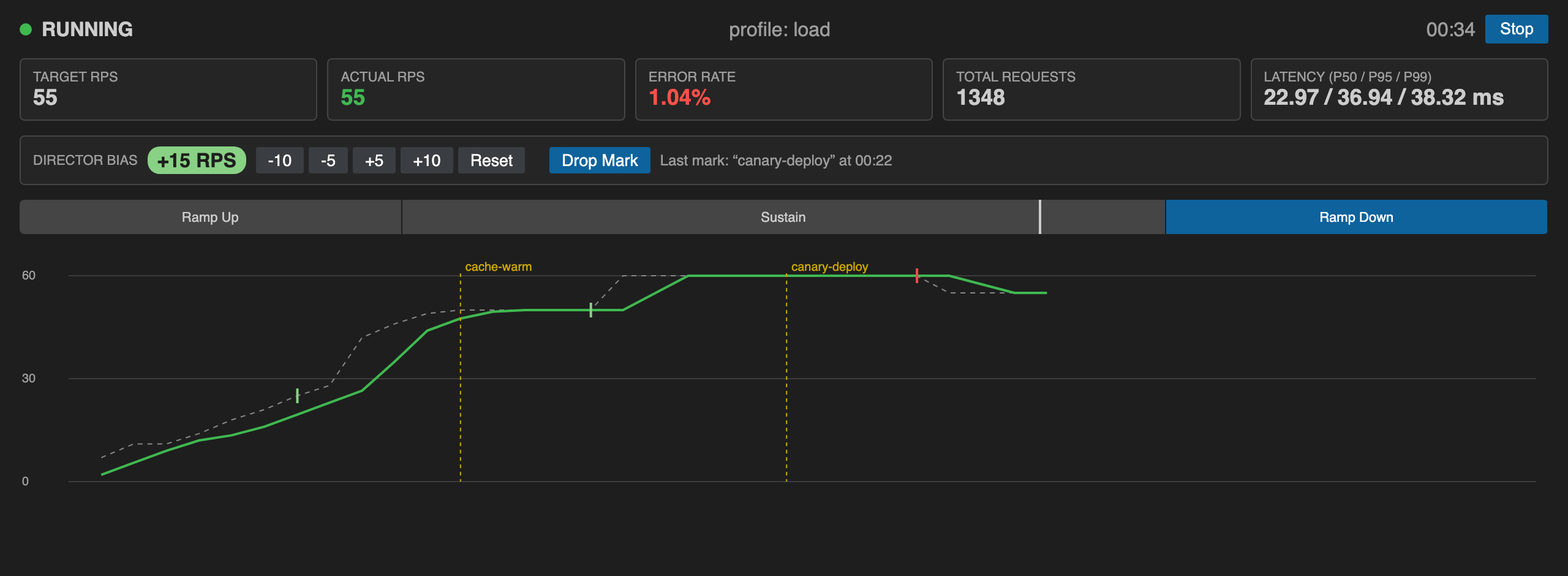
Section titled “Live control in VS Code”(VS Code extension 3.0+, gg v1.3.0+.) A control bar sits above the chart while a run is in progress:
- Director Bias — −10 / −5 / +5 / +10 change the target RPS without stopping the run; Reset returns to the planned rate. The badge shows the total bias in effect.
ggapplies a change within about a second, and the chart follows at the next heartbeat (setgg.heartbeatIntervalSecondslower for snappier feedback). - Drop Mark — asks for a label (for example
cache-cleared) and drops a named marker at the current point of the run. A mark is stamped whenggreceives it, which is when you confirm the label. - Bias changes and marks are drawn on the RPS chart — ticks on the target line, labeled dashed lines for marks — and both are recorded in the snapshot.
- Stop asks
ggto finish the run itself, so a--snapsnapshot is written with every bias change and mark. Whileggwraps up the button reads Stopping… and then turns into Force Stop; a double-click can’t accidentally cut off a snapshot being written.
With an older gg, the controls are replaced by a short notice naming the installed version, with the next step that fits how gg was installed: Update gg for the copy the extension manages, Install managed gg if yours comes from $PATH, or Open Settings if you picked a custom binary or use pathOnly mode. The run itself works as before.
🗂 Snap Explorer
Section titled “🗂 Snap Explorer”The Snaps tree view in the panel sidebar lets you:
- View a snapshot’s endpoint breakdown (latency, status distribution, response schema). For runs recorded with
ggv1.3.0+, a Manual changes section lists every mark and bias change in time order, with final bias, peak bias, how long a bias was in effect, and when the first change happened. Snapshots from older versions say that marks and bias changes were not recorded. - Diff any two snapshots — select two entries and click Diff Snapshots. When either run had marks or bias changes made by hand, a one-line notice says so, since those runs may not be like for like.
- Assert — run
gg snap assertas a CI-style gate with configurable thresholds. - Prune — clean up old snapshots by ID, tag, or age.
🔗 Smart YAML Editing
Section titled “🔗 Smart YAML Editing”- Schema validation & autocomplete for
.gg.yamlfiles — stages, snapshot tuning, and built-in profile names. - Go-to-file navigation —
Ctrl+Click/Cmd+ClickahttpFile:path to jump to the referenced.httpfile.
⚙️ Extension Settings
Section titled “⚙️ Extension Settings”| Setting | Default | Description |
|---|---|---|
gg.binaryPath | "" | Absolute path to the gg binary. Leave empty to use the auto-managed binary. |
gg.autoUpdateCheck | true | Check for a newer gg CLI version on activation. |
gg.installationMode | "auto" | auto downloads automatically, manual prompts first, pathOnly never downloads. |
gg.defaultProfile | "" | Profile to pre-select in the Quick Pick (e.g. flash-sale). |
gg.snapshotsDir | "" | Override directory for snapshot storage (--snap-dir). |
gg.heartbeatIntervalSeconds | 0 | Heartbeat cadence for headless runs. 0 uses gg’s own default (5s). |
Compatibility
Section titled “Compatibility”- VS Code
1.120.0+ - Live control needs
ggv1.3.0+ (the extension’s auto-managed binary stays current, so most installs get it automatically); everything else works with older versions - Any Open VSX-compatible editor (VSCodium, Gitpod, Eclipse Theia, etc.)
🎛 Live Control Protocol
Section titled “🎛 Live Control Protocol”Both plugins already talk to gg over its headless heartbeat stream. As of v1.3, that stream is two-way: gg --headless accepts commands over stdin — bias, mark, stop — and replies inline, without killing the process. See Driving a Run Live to try it by hand and the Live Control Protocol for the full spec. Both the JetBrains plugin (7.0+) and the VS Code extension (3.0+) are built on it: the run dashboard drives bias, mark and stop live, and a clean Stop keeps the snapshot.
A note for anyone building their own tooling on the protocol: it carries a generic signed amount for bias, not a fixed ±5 step — the widget is a UI decision, not a protocol one. Both plugins use a stepper (± buttons) for parity with the TUI’s ↑/↓ feel; a slider is a reasonable alternative using the exact same command, just debounce drag events (throttle to a few per second) — the request rate only changes once a second, so one command per pixel of drag adds noise without adding precision.